How Do Touchscreens Work? Why Your Finger Works and Gloves Don’t
Phone screens sense your finger through an invisible electrical grid. How capacitive and resistive touchscreens work, how multi-touch works and why gloves fail.
Short answer
Most phones and tablets use capacitive touchscreens. Under the glass is an invisible grid of transparent electrodes that creates a small electric field. Your body conducts electricity, so when your finger touches the glass it changes the electrical charge stored at the grid crossings beneath it. A controller chip scans the grid many times a second, finds where the change happened and reports the position of each touch. Ordinary gloves, wooden pencils and fingernails do not conduct enough to disturb the field, which is why they do not work. Older resistive screens instead detect pressure when two flexible layers are pressed together.
In this article (6)
You tap, swipe and pinch hundreds of times a day without thinking about it. Yet the glass under your finger is not just glass. Hidden inside is an invisible electrical net that feels your touch, works out exactly where it is and can follow several fingers at once.
Two main kinds of touchscreen
There are several ways to make a screen sensitive to touch, but two have dominated.
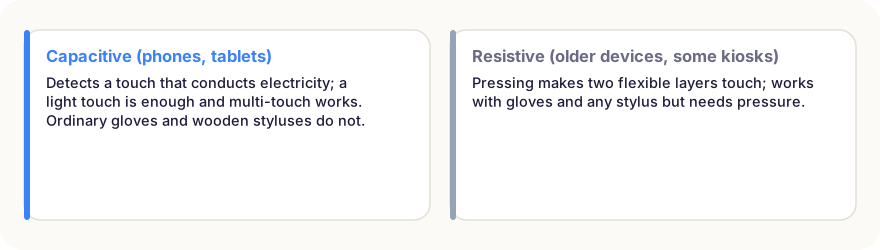
- Resistive touchscreens were common in early mobile devices, car navigation systems and some ticket machines. They are made of two thin, flexible layers with a conductive coating, separated by a tiny gap. Pressing the screen pushes the layers together, and the device measures where the contact happened.
- Capacitive touchscreens are used in almost all modern smartphones and tablets. They do not need pressure at all; a light touch is enough.
How a capacitive screen feels your finger
Under the cover glass of a capacitive screen lies a fine grid of transparent electrodes, usually made of a material called indium tin oxide. It is so thin that you can see the display through it. One set of electrodes runs in rows, the other in columns.
Where the rows and columns cross, they store a tiny amount of electrical charge, a property called capacitance. A controller chip constantly sends signals through the grid and measures the capacitance at every crossing.
Your body is a reasonably good conductor of electricity and holds electrical charge. When your finger comes close to the glass, it disturbs the electric field and changes the capacitance at the crossings directly beneath it.
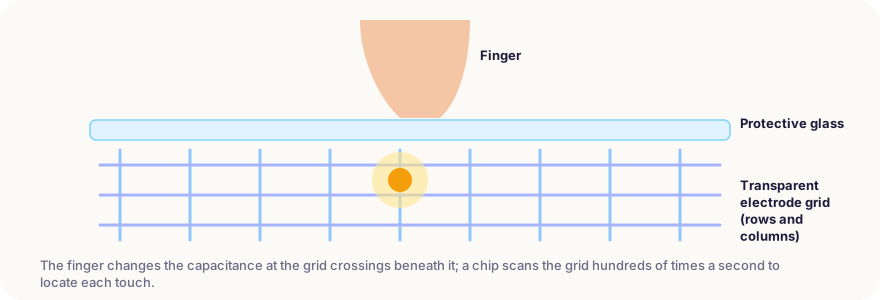
The chip scans the whole grid many times a second, often 60 to 240 times. By comparing the measurements with their normal values, it finds the patch where the field changed and calculates its centre with high precision, much finer than the spacing of the electrodes.
Multi-touch: many fingers at once
Because the controller measures every crossing separately, it can detect several separate patches at the same time. This is what makes multi-touch possible: pinching to zoom, rotating with two fingers or typing with both thumbs. The iPhone, launched in 2007, helped make this kind of projected capacitive screen standard on phones.
Software then turns raw touch points into gestures, working out whether you tapped, swiped, held or pinched, and ignoring accidental touches such as the palm of your hand.
Why gloves, nails and pencils don’t work
A capacitive screen only responds to things that disturb its electric field. Ordinary woollen or leather gloves, fingernails, pen tips and wooden pencils are poor conductors, so they barely change the capacitance and the screen ignores them.
That is why touchscreen gloves have conductive threads in the fingertips, and why simple phone styluses have a soft, conductive tip that behaves like a finger. More advanced active styluses contain their own electronics and send a signal to the screen, allowing pressure sensitivity and pinpoint accuracy for drawing.
Problems with water
Water conducts electricity too. Drops of rain or a wet finger can change the field at many points, confusing the controller and causing missed or phantom touches. Modern phones use smarter software to tell the difference between a finger and a film of water, but very wet screens can still be tricky.
In short
- Most phones use capacitive touchscreens with a hidden grid of transparent electrodes.
- Your finger, as a conductor, changes the capacitance at the grid crossings beneath it.
- A controller chip scans the grid many times a second to find each touch.
- Measuring every crossing separately allows multi-touch gestures.
- Ordinary gloves, nails and pencils don’t conduct enough to register.
- Resistive screens work by pressure instead and respond to any object.
Frequently asked questions
Why does my touchscreen act strangely when wet?
Water conducts electricity, so drops on the glass can change the electric field like extra fingers, causing false touches or making real touches hard to detect. Many phones now include software that tries to filter this out.
Why does a screen protector sometimes make touch worse?
Capacitive screens sense your finger through the glass. A very thick protector or trapped air bubbles increase the distance and weaken the signal, which can make touches less reliable.
How does a stylus work on a phone?
Simple styluses for phones have a soft, conductive tip that acts like a finger. Active styluses, such as those for some tablets, contain electronics and send their own signal, allowing pressure sensitivity and much finer precision.
Can a touchscreen tell how hard I press?
Standard capacitive screens mainly detect location, but some devices add extra sensors or estimate pressure from how large the touched area is.
Sources
- Walker, G. (2012). A review of technologies for sensing contact location on the surface of a display. Journal of the Society for Information Display
- Encyclopaedia Britannica – Touchscreen
This article is based on peer-reviewed research and publications from trusted institutions, and it is reviewed regularly. How we work →
You might also wonder
All in How Things Work →
How Do Aeroplanes Fly? Lift, Wings and a Famous Myth
A jumbo jet weighs hundreds of tonnes, yet stays in the air. How wings create lift, the four forces of flight, and why a popular explanation is wrong.
How Does GPS Work? Satellites, Atomic Clocks and Einstein
Your phone finds its position from satellites 20,000 km away. How GPS uses signal timing, why it needs four satellites and why Einstein’s relativity matters.
How Do Rechargeable Batteries Work? Inside a Lithium-Ion Battery
Your phone’s battery moves lithium ions back and forth between two layers. How charging works, why batteries wear out and the habits that make them last longer.

How Does a Fridge Work? It Doesn’t Make Cold – It Moves Heat
A fridge doesn’t make cold; it pumps heat from inside to the kitchen. How the cooling cycle works, why the back is warm and why an open door won’t cool a room.
How Does Wi-Fi Work? Radio Waves, Routers and Why Walls Slow It Down
Wi-Fi sends data through the air as radio waves. How routers encode information, what 2.4, 5 and 6 GHz mean, and why your signal drops in some rooms.
How Do Bats See in the Dark? Echolocation Explained
Bats are not blind, but many hunt in total darkness by listening to echoes. How echolocation works, how fast bats call, and how moths fight back.